# Bonsai Docs
💡 Welcome to Bonsai’s Support Center!
We are dedicated to assisting you with any inquiries you may have. If you can't find the information you're looking for, feel free to reach out to us at `support@bonsai.trade`
Bonsai is a young community that offers a premium collection of trading tools for TradingView, designed to enhance your trading experience. In addition to the industry-leading charting capabilities, you will gain access to exclusive trading signals, in-depth analysis, and a supportive community. Our network of novice, intermediate, and expert traders shares valuable insights and provides guidance to help you build your confidence in trading through our [Discord](https://discord.gg/bonsai) server.
[Join Bonsai now](https://bonsai.trade/) and discover why we are the top choice for traders!
***
## Membership ♣️
As a Bonsai member, you'll enjoy exclusive access to our trading tools, insightful market analysis, and a thriving community of like-minded crypto traders. Join Bonsai today and watch your trading skills flourish alongside our community.
***
## General Instructions 📖
Follow [this link](/bonsai-docs/get-access-on-tradingview) to learn more about how to access Bonsai scripts on TradingView.
***
## TradingView Scripts 📊
🔼 [**Bonsai**](/bonsai-docs/bonsai)
🔼 [**Bonsai OS**](/bonsai-docs/bonsai-os-oscillator)
🔼 [**Bonsai Backtester**](/bonsai-docs/bonsai-bx-backtester)
***
## Connect with Us 🗨️
* [TradingView](https://www.tradingview.com/u/bonsai_trade/)
* [Discord](https://discord.gg/bonsai)
* [Telegram](https://t.me/Bonsai_Trade)
* [YouTube](https://www.youtube.com/@bonsai_trade)
* [X (formerly Twitter)](https://twitter.com/bonsai_trade)
* [LinkedIn](https://www.linkedin.com/company/bonsai-trade/)
* [Instagram](https://instagram.com/get.bonsai)
* [Facebook](https://www.facebook.com/get.bonsai.trade)
* [TikTok](https://www.tiktok.com/@bonsai_trade)
# Get Access on TradingView
To access Bonsai on TradingView, you must have an active subscription. Start your subscription by visiting [bonsai.trade](https://bonsai.trade/). Once your subscription is active, follow the steps below to access Bonsai tools on TradingView:
1. Visit [tradingview.com/chart](https://www.tradingview.com/chart/) to open a new chart.
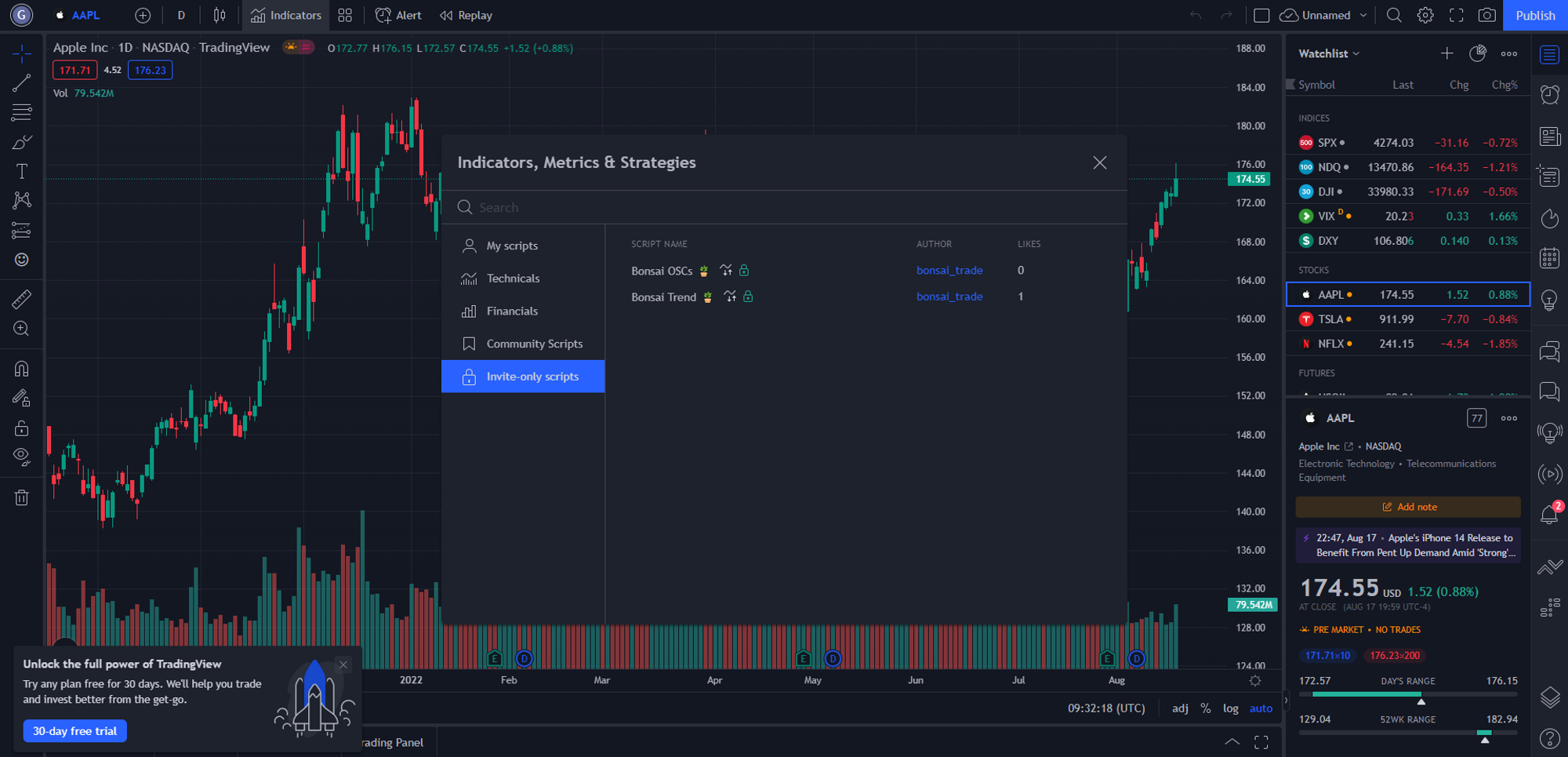
2. Locate the toolbar at the top of the screen, and click on "Indicators." From the dropdown menu, navigate to "Invite-Only Scripts" as shown in the image below.
3. After subscribing to Bonsai, you should see the Bonsai scripts in the Invite-Only panel. (Note: You may need to refresh your account after subscribing for the changes to take effect.)
4. Choose one of the Scripts according to your requirement and subscription and the indicators will be visible on the charts.
# Bonsai
🌳 Bonsai: Trading Precision, Simplified 🌳
## **🌳 Bonsai: Trading Precision, Simplified 🌳**
### 🌟 Overview
Discover Bonsai: an intuitive indicator tailored to streamline market trend identification. By harnessing proprietary calculations, Bonsai delivers insightful trading signals, all shaped by a single core element: sensitivity.
### 📊 Features
* **Dynamic Sensitivity Modes**: Straightforward yet comprehensive settings:
* **(Auto) Slow, Mid, or Fast**: Bonsai automatically adapts its sensitivity in these modes, aligning seamlessly with market dynamics.
* 'Slow': Approach to catch larger market movements, generating fewer signals.
* 'Mid': A balanced mode producing a moderate number of signals.
* 'Fast': Targeted at quick market fluctuations, yielding more frequent signals.
* **Manual**: A mode for those who prefer to set the pace. Tailor the sensitivity to your specific trading goals and preferences.
* **Clear Visualization**:
* **Trend Colors**: Green indicates upward momentum; Red signifies downward trends.
* **Customizability**: Modify trend colors with adjustable gradient intensity and opacity.
* **Performance Insights**: A table displaying the effectiveness of all modes, guiding your strategy choices.
* **ALMA Integration**: Bonsai incorporates the Arnaud Legoux Moving Average, enhancing trend line accuracy.
* **Dashboard Color Options**: Toggle between light and dark themes for ideal chart visibility.
* **Alert System**: Receive buy/sell signals in real-time and establish alerts to stay ahead.
* **Compatibility**: 'Buy ▲' and 'Sell ▼' plots as 1 or 0. This allow users to seamlessly integrate outputs as a source for other indicators, enhancing its compatibility and versatility.
### 🎛 How To Use Bonsai
1. Begin by selecting your desired sensitivity mode.
2. Observe the color cues to decode market directions.
3. Refer to the performance insights to refine your strategy.
4. Activate alerts to remain updated on prospective trading avenues.
### 📜 Feedback and Continuous Improvements
Your insights power Bonsai's growth. As the trading realm evolves, so will Bonsai, ensuring we cater to the dynamic needs of traders. Together, we make trading smarter with Bonsai. 🌳
### 🚀 Elevate Your Trading
Seeking a sharper view of the market? Integrate Bonsai into your TradingView suite. Crafted with our advanced algorithms and customizable to your preferences, Bonsai is here to assist you in your trading journey.
### ❗️ Disclaimer
Bonsai is an indicator, distinct from a trading strategy. The performance table provides insights for informational and comparative purposes only and does not guarantee accuracy. Be aware of the inherent risks in trading. Conduct comprehensive research and consider various factors before making any trading moves. Bonsai aids in market analysis but doesn't promise specific outcomes.
# Bonsai OS (Oscillator)
🌳 Bonsai: Trading Precision, Simplified 🌳
## 🌳 Bonsai OS: The All-in-One Oscillator 🌳
### 🌟 Overview
**Bonsai OS** offers a comprehensive oscillator suite tailored to meet diverse trading needs. By consolidating multiple distinguished oscillators, this tool streamlines analysis while employing advanced algorithms to detect bullish and bearish divergence patterns, providing users with clear insights into potential reversal areas.
***
### 📊 Key Features
* **Multi-Oscillator Selection**: Transition seamlessly between four of the trading world's prime oscillators:
* RSI (Relative Strength Index)
* CCI (Commodity Channel Index)
* Stochastic
* MACD (Moving Average Convergence Divergence)
* **Dynamic Coloring**: Oscillator line hues adjust based on market conditions:
* Green in oversold zones.
* Red in overbought zones.
* A customizable default color for neutral areas.
* **Advanced Source Customization**:
* Option to select default data sources.
* Toggle to employ High & Low as data sources.
* **Divergence Indicators**: Precise bullish and bearish divergence signals facilitate potential reversal spotting.
* Exclusive signals for the combined divergences of RSI, CCI, and Stochastic.
* **Price Strength Background**: A groundbreaking gradient background that displays price strength with changeable transparency and intensity.
* **Instant Alerts**: Configure notifications for bullish and bearish divergence insights.
* **Compatibility**: 'Bullish Divergence ▲', 'Getting Bullish ▲', 'Getting Bearish ▼' and 'Bearish Divergence ▼' are plotted as non-displayable 1 or 0. This allow users to seamlessly integrate outputs as a source for other indicators, enhancing its compatibility and versatility.
***
### 📜 Feedback and Updates
Bonsai OS thrives on your feedback. Together, let's revolutionize the realm of trading tools. 🌳
***
### ❗️ Disclaimer
Trading inherently carries risks. While **Bonsai OS** is crafted to augment your analytical arsenal, it is paramount to combine its insights with comprehensive research and market understanding. Always prioritize making informed decisions and consider seeking advice from financial professionals.
# Bonsai BX (Backtester)
🌳 Bonsai: Trading Precision, Simplified 🌳
## **🌳** Bonsai Backtester: A Universal Strategy Tester 🌳
### 🌟 Introduction
Navigating through trading strategies often presents complexities. Bonsai Backtester simplifies this journey by offering a sophisticated, comprehensive solution for evaluating multiple trading strategies. Developed in collaboration with the Bonsai community, this tool aims to provide traders with insightful, data-driven analyses. Additionally, it introduces a set of innovative features not commonly found in existing tools, significantly contributing to the collective capabilities available within the TradingView community.
Read the disclaimer section at the end
### 📊 Specifics
#### Displayed Backtest Details
* Conducted over daily candles for BTCUSD on the Coinbase exchange, beginning in March 2015.
* Incorporates signals from the Bonsai indicator for long and short entries. This indicator is presented in the publication chart for reference.
* Adopts the following parameters to offer a realistic and modest trading scenario:
* Initial Capital: $1,000
* Maximum Position Size: 10% of equity per trade
* Stop Loss: 10% per position
* Commission: 0.1%
* Slippage: 100 ticks
***
### 🎯 Features
#### 📡 External Indicator Compatibility
Bonsai Backtester is engineered to accept output signals from either built-in or custom indicators available on TradingView. These signals can serve as separate or combined inputs for long and short positions, as well as act as filters, thereby broadening the spectrum of strategy alternatives.
***
#### 📋 Quick Insights Table
For a quicker understanding of your strategy's performance, the tool includes a table that shows key data such as equity, open profit, current position size, and entry price.
***
#### ⏳ Timeframe Customization
Users have the flexibility to tailor the backtesting period, making it possible to refine analyses to specific trading days or sessions.
***
#### 🎯 Risk Management
Our tool integrates a multifaceted Take Profit and Stop Loss system that grants traders the freedom to personalize their risk strategy. Among its features is a trailing stop mechanism with trigger settings, such as percentage-based and breakeven triggers.
***
#### 🌈 Dashboard Themes
Dark or light theme options for optimal visual background.
***
### 📜 How to Operate
1. Add the Bonsai Backtester to your TradingView chart.
2. Open the script parameters to adjust the settings and incorporate signals from external indicators.
3. Once configured, utilize the tool to optimize and fine-tune your trading strategy.
***
### 🌐 The Bonsai Community
Input from the Bonsai community is pivotal for the script's ongoing refinement. As part of our commitment to adaptive, smart trading, this script will continually be updated to meet the ever-changing requirements of traders. Let's cultivate smarter trading, the Bonsai way! 🌳📊
***
### ❗️ Disclaimer
Backtesters are built to simulate historical trading scenarios and should never be viewed as a forecast of future outcomes. It's crucial to conduct your own thorough due diligence, weighing all factors like current market conditions and financial risks before committing to any trading action.
# Integrating Indicators
Developed a custom indicator on TradingView and wish to backtest it? Bonsai BX is your solution. Use your indicator outputs as inputs for the Bonsai BX backtester.
{% hint style="info" %}
This is needed especially if your indicators display signals as shapes on the chart, which are not directly usable as sources for other indicators or strategies on TradingView.
{% endhint %}
**Step-by-Step Guide:**
1. **Access Pine Script Editor.** Open your Pine Script editor on TradingView and select your custom indicator.
2. **Modify Your Script.** Append this code at the end of your script:
```pine_v5
plot(long_condition ? 1 : 0, title = "🌳 Your_Long_Condition", display = display.none, editable = false)
plot(short_condition ? 1 : 0, title = "🌳 Your_Short_Condition", display = display.none, editable = false)
```
* Replace `long_condition` and `short_condition` with the variable names in your script that signal the long and short conditions.
* Change `"Your_Long_Condition"` and `"Your_Short_Condition"` to preferred names for your long and short signals.
3. **Attach to Your Chart.** Add this modified indicator script to your TradingView chart, along with the Bonsai BX (Backtester).
4. **Configure Bonsai BX Settings.** In Bonsai BX settings, locate the "Quick Sources 🌳" section and input your newly named signals.
**Outcome:** By following these steps, your custom TradingView indicators will effectively feed into Bonsai BX, allowing for comprehensive backtesting of your strategies.
# Automating TradingView Strategies with Superhook
Here, we’ll show you how to connect your strategies to Bonsai’s trading bots, whether you’re using TradingView or another application. With just one POST request, Superhook can turn any market signal
### Introduction to Superhook
Superhook is Bonsai’s solution that links a variety of external tools—like TradingView, third-party services, or your own custom software—to your trading bot. By using webhooks (HTTP POST requests), Superhook receives incoming JSON payloads and instantly executes trades based on the instructions you provide. This flexible design means you can integrate with almost any platform or programming language.
> **Note**: While our examples use TradingView, you can use Superhook from any source as long as you can generate a valid JSON payload and send it to `https://trade.superhook.io/v1/crypto` via an HTTP POST request.
###
### Step-by-Step Integration Guide
#### Step 1: Prepare Your Strategy
* **TradingView Users**
1. You’ll need a strategy (e.g., a PineScript strategy or indicator) applied to your chart.
2. If you haven’t already, browse TradingView’s public library or use [Bonsai's tools for TradingView](https://app.bonsai.trade/branch/trade).
* **Other Platforms or Apps**
1. Make sure you have some logic that decides when to buy or sell.
2. When your logic signals a trade, you’ll send a POST request to Superhook.
#### Step 2: Create or Configure Your Webhook / POST Request
* **TradingView Alerts**
1. In TradingView, create an alert.
2. Specify the condition that triggers the alert (e.g., “Order fills only” if you want alerts only upon filled orders).
* **Other Sources**
1. Use your application’s method for making HTTP POST requests (e.g., `fetch` in JavaScript, `requests` in Python, or `cURL` on the command line).
2. Point it to `https://trade.superhook.io/v1/crypto`.
#### Step 3: Craft the JSON Payload
Superhook reads a JSON payload that tells your Bonsai Bot how to execute a trade. Below is an overview of each key field:
* **token** (string, required)\
Your private authentication token for Superhook. Keep this secret at all times.
* **bot\_id** (string, required)\
The unique identifier of the Bonsai Bot you want to control.
* **symbol** (string, required)\
The market you want to trade (e.g., `"BTC/USDC"`).
* **market\_position** (string, optional)\
Accepts `"long"`, `"short"`, or `"flat"`. Sending `"flat"` instructs Superhook to close any open positions for the given symbol. This field is especially convenient for TradingView strategies because TradingView automatically outputs these exact values (`long`, `short`, or `flat`) in its strategy alerts. As a result, you can use the same JSON template on multiple charts or strategies without needing to adjust your payload for each new setup—TradingView handles the position state for you.
* **side** (string, conditionally required)\
The trade direction: `"buy"` or `"sell"`.
* **Required** if you are *not* using the `command` field.
* **amount** (number, conditionally required)\
How many units/contracts to buy or sell.
* **Required** if you are *not* using the `command` field.
* **command** (string, optional)\
A direct instruction to the bot. If this is provided, `side` and `amount` are not used.
* **Possible values**:
* `"cancel_all_orders"`: Cancels all open orders for the given `symbol`.
* `"close_all_at_market"`: Closes all open positions for the given `symbol` immediately at market.
* Useful for implementing custom stop-loss behavior or quick position management from any external trigger.
#### TradingView Placeholder Example
If you’re using TradingView, you can take advantage of placeholder variables that TradingView replaces with live data:
```json
{
"token": "your_private_token",
"bot_id": "your_bot_id",
"symbol": "{{syminfo.basecurrency}}/{{syminfo.currency}}",
"market_position": "{{strategy.market_position}}",
"side": "{{strategy.order.action}}",
"amount": {{strategy.order.contracts}}
}
```
#### Hard-Coded or Custom Values
If you want to use fixed values or send data from your own software, simply include the fields you need:
```json
{
"token": "your_private_token",
"bot_id": "your_bot_id",
"symbol": "BTC/USDC",
"market_position": "long",
"side": "buy",
"amount": 1
}
```
#### Command-Only Payload Example
If you want to close all current positions at market price (for instance, to implement a stop-loss), you can use the `command` field without `side` or `amount`:
```json
{
"token": "your_private_token",
"bot_id": "your_bot_id",
"symbol": "BTC/USDC",
"command": "close_all_at_market"
}
```
#### Why It Works
Superhook doesn’t care where your data comes from—it only requires a valid JSON structure. For TradingView, placeholders are replaced automatically. For other apps, you can dynamically generate or hard‑code the payload. Just make sure each required field (or the `command` field) is present.
> **Overriding the Chart Symbol**\
> Because the `symbol` field is just text in your JSON payload, you can specify *any* symbol—even if it doesn’t match the chart you’re currently viewing in TradingView. For example, you could be on a chart showing **BTC/USDT** but still use `"symbol": "{{syminfo.basecurrency}}/USDC"` in your payload, causing the trade to execute on **BTC/USDC**. This flexibility allows you to analyze one market while executing trades on another.
#### Step 4: Enable the Webhook URL
* **TradingView**
1. In the alert settings, check “Webhook URL.”
2. Set it to `https://trade.superhook.io/v1/crypto`.
* **Other Applications**
1. Confirm your code sends HTTP POST requests to `https://trade.superhook.io/v1/crypto`.
#### Step 5: Send the Request
* **TradingView**\
When your alert condition triggers, TradingView automatically sends the JSON payload to Superhook.
* **Other Sources**\
Whenever your application or script decides to trade, it should POST the JSON payload to Superhook. That will be processed and passed on to your Bot for execution.
***
### Troubleshooting
1. **No Alerts or No Trades**
* Verify you’re sending an HTTP POST to `https://trade.superhook.io/v1/crypto`.
* Double-check that the JSON payload is properly formatted.
* Ensure the minimal required fields are present (`token`, `bot_id`, `symbol`, plus either `side`/`amount` or `command`).
2. **Incorrect Trades**
* Make sure `token` and `bot_id` are correct.
* If you’re using placeholders, confirm they match TradingView’s syntax or your own variables.
* Check the `symbol` field to ensure it corresponds to the market you want to trade.
3. **Authentication Failures**
* Double-check your `token` value. It must match the private token assigned to your Bonsai Bot. Never share this token publicly.
# Manifesto
### **Rooted Wisdom for the Modern Trader**
In the tranquil world of cultivation, every delicate snip is intentional, every growth a testament to patience and foresight. Bonsai embodies this serenity and deliberateness, crafting a trading experience that transcends the tumultuous nature of the markets.
**The Practice of Patience**
Trading, much like the growing of a Bonsai, is not a pursuit for the hurried. True mastery emerges from the quietude of patience. It's the steady hand and the measured thought that carves success in the market's ever-shifting landscape. In the fast-paced trading environment, the ability to wait for the right moment is what distinguishes the seasoned trader. Here, we stand as the gardener to your investments, ensuring that each decision is nurtured to fruition with a composed mind.
> 🌱 **Insight**: A Bonsai grows strongest when tended with a calm and focused spirit. Approach your trades with the same mindfulness, and watch as steadfast patience bears fruit.
**Precision in Practice**
Our algorithms, your shears. With Bonsai, precision is not simply a feature — it is the essence of our craft. We shape the chaos of data into a panorama of clarity and opportunity, enabling you to carve out your path in the markets with confident, deliberate strokes.
**Growth Through Harmony**
A portfolio, much like a Bonsai, thrives on balance and diversification. It is a living entity, requiring careful attention and a nurturing touch. We provide the tools to not just tend to your investments, but to cultivate a thriving financial ecosystem that grows in harmony with your goals.
**Safeguarding the Sanctuary**
Your investments, like the pot that cradles the Bonsai roots, must be fortified. We uphold the highest standards of security, ensuring that the foundation of your trading journey is as solid and unshakable as ancient stone.
**The Shared Soil of Community**
Just as individual trees contribute to the beauty of a garden, each member enriches our community. Bonsai is not just a platform; it's a gathering of minds, a confluence where ideas, much like streams, meet and merge into the larger river of collective wisdom.
**The Evergreen Market and You**
Markets evolve, and with them, so must we. Like the Bonsai that shifts subtly with the seasons, a trader's strategies must reflect a responsiveness to change. We encourage people to adapt, creating an environment where learning is as constant as the flow of the market.
**Join Us**
Begin your Bonsai journey. Plant the seeds of disciplined investment today, and cultivate a future of robust growth.